Monday, October 5, 2009

Jaringan Ad-Hoc di Windows XP (Wireless)

Jika anda pengguna Windows XP, anda dapat dengan mudah membagi koneksi internet yang terhubung ke komputer anda dengan komputer lain menggunakan Wireless dengan membuat suatu jaringan rumahan atau yang dikenal dengan Ad-Hoc. Kita tidak memerlukan router atau HUB, yang dibutuhkan hanyalah komputer/laptop dengan perangkat wireless.

1. Pertama-tama, nyalakan wireless yang ada di komputer atau laptop anda.Kemudian buka Control Panel > Network Connection

2. Klik kanan di "Wireless Network Connection" dan pilih properties (Pastikan bahwa Wireless Network Connection telah di-enable)

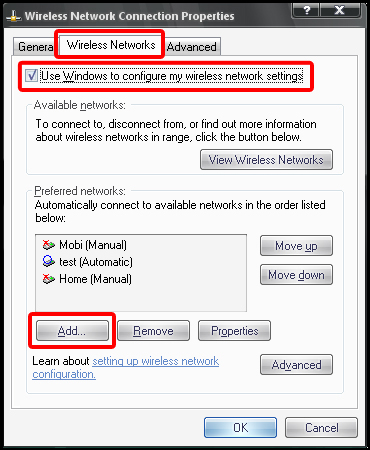
3. Sebuah window baru akan muncul, pilih lah Tab "Wireless Network" di bagian atas window. Pastikan kotak "Use Windows to configure my wireless network settings" diberi tanda centang. Kemudian klik  "Add".


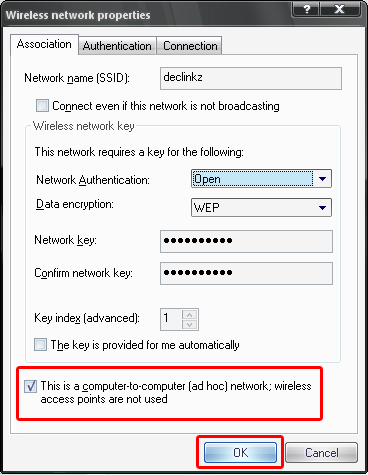
4. Masukkan nama network yang anda kehendaki di dalam kotak "Network name (SSID)". Jika anda tidak ingin sembarang orang terhubung kedalam jaringan anda, anda dapat memberikan password untuk jaringan anda. Untuk memberikan password, hapus tanda centang dari kotak "The key is provided for me automatically". Kemudian di menu drop down "Network Authentication", pilih Open atau Shared jika anda ingin menggunakan WEP sebagai password jaringan anda. Anda juga dapat menggunakan WPA sebagai password jaringan anda, pilih "WPA-None" dari menu drop down jika anda ingin menggunakan WPA (di beberapa komputer, WPA-PSK). Jika anda TIDAK INGIN memberikan password untuk jaringan anda, pilih "Open" dari menu drop down "Network Authentication" dan pilih "disabled" dari menu drop down "Data Encryption".

-------------------------------------------------------------------
OPTIONAL:
Menggunakan WEP sebagai Password Jaringan (Network Key)
Jika anda ingin menggunakan WEP (Wired Equivalent Privacy) sebagai Network Key, ada beberapa hal yang harus anda ingat:
1. Anda hanya dapat menggunakan 8 ATAU 13 karakter untuk password dengan 1 tipe karakter (Alfabet ATAU Angka - salah satu)
2. Untuk Password dengan 2 tipe karakter (Alfabet DAN Angka), anda hanya bisa menggunakan 10 ATAU 26 karakter

Menggunakan WPA sebagai Password Jaringan (Network Key)
Seperti WEP, jika anda ingin menggunakan WPA (Wi-Fi Protected Access) sebagai Network Key, ada beberapa hal yang harus anda ingat juga:
1. Anda hanya dapat menggunakan 8 SAMPAI 63 karakter untuk password dengan 1 tipe karakter (Alfabet ATAU Angka - salah satu)
2. Untuk Password dengan 2 tipe karakter (Alfabet DAN Angka), anda hanya bisa menggunakan 8 SAMPAI 64 karakter
-------------------------------------------------------------------

5. Sekarang untuk menjadikan jaringan tersebut jaringan antar komputer (Ad-Hoc Network), Beri tanda centang pada kotak "This is a computer-to-computer (ad hoc) wireless; wireless access points are not used" di bagian bawah window. Kemudian klik OK.


Read More..

Monday, September 7, 2009

Quotes and Wise Sayings | Wisdom Words

Be not angry that you cannot make others as you wish them to be, since you cannot make yourself as you wish to be. ~Thomas à Kempis, Imitation of Christ, c.1420

You've got a lot of choices. If getting out of bed in the morning is a chore and you're not smiling on a regular basis, try another choice. ~Steven D. Woodhull

What saves a man is to take a step. Then another step. It is always the same step, but you have to take it. ~Antoine de Saint-Exupéry, Wind, Sand and Stars, 1939, translated from French by Lewis Galantière

Don't wait for the Last Judgment. It happens every day. ~Albert Camus, The Fall, 1956

Good for the body is the work of the body, and good for the soul is the work of the soul, and good for either is the work of the other. ~Henry David Thoreau

Remember, if you’re headed in the wrong direction, God allows U-turns! ~Allison Gappa Bottke

Anyone can carry his burden, however hard, until nightfall. Anyone can do his work, however hard, for one day. Anyone can live sweetly, patiently, lovingly, purely, till the sun goes down. And this is all life really means. ~Robert Louis Stevenson

If you don't like how things are, change it! You're not a tree. ~Jim Rohn

In what you say of another, apply the test of kindness, necessity and truth, and let nothing pass your lips without a 2/3 majority. ~Liz Armbruster

See everything; overlook a great deal; correct a little. ~Pope John XXIII

Though the circular round-and-round of routine be the bulk of life's affairs, make an occasional jutting diversion - of fun, love, or something that will outlast you - so the shape and motion of your life shall resemble the round lifegiving sun with bright rays shining forth from all directions. ~Destin Figuier

Enjoy when you can, and endure when you must. ~Johann Wolfgang von Goethe

You will turn over many a futile new leaf till you learn we must all write on scratched-out pages. ~Mignon McLaughlin, The Neurotic's Notebook, 1960

Now that it's all over, what did you really do yesterday that's worth mentioning? ~Coleman Cox

Laziness will cause you pain. ~Slogan on T-shirt worn at the Vee Arnis Jitsu School of Self-Defense

If you surrender to the wind, you can ride it. ~Toni Morrison

Do not confuse your vested interests with ethics. Do not identify the enemies of your privilege with the enemies of humanity. ~Max Lerner, Actions and Passions, 1949

Never miss an opportunity to make others happy, even if you have to leave them alone in order to do it. ~Author Unknown

Sometimes it's more important to be human, than to have good taste. ~Brecht

[O]wning your burdens is half the battle. ~From the television show Scrubs

Have courage for the great sorrows of life and patience for the small ones; and when you have laboriously accomplished your daily task, go to sleep in peace. ~Victor Hugo

We have to live today by what truth we can get today and be ready tomorrow to call it falsehood. ~William James

You can tell more about a person by what he says about others than you can by what others say about him. ~Leo Aikman

Seek freedom and become captive of your desires. Seek discipline and find your liberty. ~Frank Herbert, Dune Chronicles

The first and greatest victory is to conquer yourself; to be conquered by yourself is of all things most shameful and vile. ~Plato

Pick battles big enough to matter, small enough to win. ~Jonathan Kozel

Tough and funny and a little bit kind: that is as near to perfection as a human being can be. ~Mignon McLaughlin, The Second Neurotic's Notebook, 1966

I would not waste my life in friction when it could be turned into momentum. ~Frances Willard

Always when judging
Who people are,
Remember to footnote
The words "So far."
~Robert Brault

God grant me the serenity to accept the people I cannot change, the courage to change the one I can, and the wisdom to know it's me. ~Author unknown, variation of an excerpt from "The Serenity Prayer" by Reinhold Neibuhr

People cannot go wrong, if you don't let them. They cannot go right, unless you let them. ~Augustus William Hare and Julius Charles Hare, Guesses at Truth, by Two Brothers, 1827

Excess on occasion is exhilirating. It prevents moderation from acquiring the deadening effect of a habit. ~W. Somerset Maugham, The Summing Up, 1938

The vow that binds too strictly snaps itself. ~Alfred Lord Tennyson, "The Last Tournament," Idylls of the King

I make the most of all that comes and the least of all that goes. ~Sara Teasdale, "The Philosopher"

Every one should keep a mental wastepaper basket and the older he grows the more things he will consign to it - torn up to irrecoverable tatters. ~Samuel Butler

Do what you can, with what you have, where you are. ~Theodore Roosevelt

Whatever we worship, short of God, is sure to be our undoing. ~Mignon McLaughlin, The Neurotic's Notebook, 1960

Toss your dashed hopes not into a trash bin but into a drawer where you are likely to rummage some bright morning. ~Robert Brault

I think it pisses God off if you walk by the color purple in a field somewhere and don't notice it.... People think pleasing God is all God care about. But any fool living in the world can see it always trying to please us back. ~Alice Walker, The Color Purple, 1982

Be pleasant until ten o'clock in the morning and the rest of the day will take care of itself. ~Elbert Hubbard

On the bathing-tub of King T'ang the following words were engraved: "If you would one day renovate yourself, do so from day to day. Yea, let there be daily renovation." ~Confucian Analects

The difference between ordinary and extraordinary is that little extra. ~Jimmy Johnson

What a strange narrowness of mind now is that, to think the things we have not known are better than the things we have known. ~Samuel Johnson

To sensible men, every day is a day of reckoning. ~John W. Gardner

There is a time for departure even when there's no certain place to go. ~Tennessee Williams (Thomas Lanier)

Face what you think you believe and you will be surprised. ~William Hale White

Grown-ups love figures. When you tell them that you have made a new friend, they never ask you any questions about essential matters. They never say to you, "What does his voice sound like? What games does he love best? Does he collect butterflies?" Instead, they demand: "How old is he? How many brothers has he? How much does he weigh? How much money does his father make?" Only from these figures do they think they have learned anything about him. ~Antoine de Saint-Exupéry, The Little Prince, 1943, translated from French

Just remember, there's a right way and a wrong way to do everything and the wrong way is to keep trying to make everybody else do it the right way. ~M*A*S*H, Colonel Potter

Don't look where you fall, but where you slipped. ~African Proverb

One can enjoy a wood fire worthily only when he warms his thoughts by it as well as his hands and feet. ~Odell Shepherd

Practical life teaches us that people may differ and that both may be wrong: it also teaches us that people may differ and both be right. Anchor yourself fast in the latter faith, or the former will sweep your heart away. ~Augustus William Hare and Julius Charles Hare, Guesses at Truth, by Two Brothers, 1827

The important thing is this: To be able at any moment to sacrifice that which we are for what we could become. ~Charles DuBois

Look at everything as though you were seeing it either for the first or last time. ~Betty Smith, A Tree Grows in Brooklyn

Time you enjoy wasting, was not wasted. ~John Lennon

It is every man's obligation to put back into the world at least the equivalent of what he takes out of it. ~Albert Einstein

Decorate yourself from the inside out. ~Andrei Turnhollow

Have a heart that never hardens, a temper that never tires, a touch that never hurts. ~Charles Dickens

We have a choice every day - to act on yesterday's good intentions or get an early start on tomorrow's regrets. ~Robert Brault

When you start treating people like people, they become people. ~Paul Vitale

Be kind to your shadow. ~Rebecca Lawless

I thought growing up was something that happened automatically as you got older. But it turns out it's something you have to choose to do. ~From the television show Scrubs

If you have to do it every day, for God's sake learn to do it well. ~Mignon McLaughlin, The Neurotic's Notebook, 1960

Most of the shadows of this life are caused by our standing in our own sunshine. ~Ralph Waldo Emerson

You do not have the right to quit trying. (The universe wobbles when you do.) You have the right to quit Toxic People. (They're contagious.) ~Dr. SunWolf

Dare to be imperfect and one day there will tug at your sleeve a soulmate. ~Robert Brault

Don't judge each day by the harvest you reap but by the seeds that you plant. ~Robert Louis Stevenson

In this age, which believes that there is a short cut to everything, the greatest lesson to be learned is that the most difficult way is, in the long run, the easiest. ~Henry Miller, The Books in My Life

Never explain. Your friends do not need it and your enemies will not believe it anyway. ~Elbert Hubbard, A Thousand and One Epigrams, 1911

Do not condemn the judgment of another because it differs from your own. You may both be wrong. ~Dandemis

Whatever you are be a good one. ~Abraham Lincoln

It's better to fight for something than against something. ~Author Unknown

The day will happen whether or not you get up. ~John Ciardi

Nature gave men two ends - one to sit on and one to think with. Ever since then man's success or failure has been dependent on the one he used most. ~George R. Kirkpatrick

One should always play fair when one has the winning cards. ~Oscar Wilde

Think of your faults the first part of the night when you are awake, and the faults of others the latter part of the night when you are asleep. ~Chinese Proverb

When you live in reaction, you give your power away. Then you get to experience what you gave your power to. ~N. Smith

When "Why not do it?" barely outweights "Why do it?" - don't do it. ~Mignon McLaughlin, The Neurotic's Notebook, 1960

If you hate your lot but wouldn't trade it, it's not your lot you hate. ~Mignon McLaughlin, The Second Neurotic's Notebook, 1966

Half the failures in life arise from pulling in the horse as he is leaping. ~Augustus William Hare and Julius Charles Hare, Guesses at Truth, by Two Brothers, 1827

When you invite trouble, it's usually quick to accept. ~Quoted in P.S. I Love You, compiled by H. Jackson Brown, Jr.

Giving up doesn't always mean you are weak. Sometimes it means that you are strong enough to let go. ~Author Unknown

Promise only what you can deliver. Then deliver more than you promise. ~Author Unknown

All philosophy in two words, - sustain and abstain. ~Epictetus

Always watch where you are going. Otherwise, you may step on a piece of the Forest that was left out by mistake. ~Pooh's Little Instruction Book, inspired by A.A. Milne

Don't compromise yourself. You're all you've got. ~Janis Joplin

Life is like riding a bicycle - in order to keep your balance, you must keep moving. ~Albert Einstein

The biggest problem in the world
Could have been solved when it was small.
~Witter Bynner, The Way of Life According to Laotzu

In the hopes of reaching the moon men fail to see the flowers that blossom at their feet. ~Albert Schweitzer

Don't ever take a fence down until you know why it was put up. ~Robert Frost

What you can't get out of, get into wholeheartedly. ~Mignon McLaughlin, The Neurotic's Notebook, 1960

Surely a man needs a closed place wherein he may strike root and, like the seed, become. But also he needs the great Milky Way above him and the vast sea spaces, though neither stars nor ocean serve his daily needs. ~Antoine de Saint-Exupéry, The Wisdom of the Sands, translated from French by Stuart Gilbert

Never believe in mirrors or newspapers. ~Tom Stoppard

I may be justifying my pockets of chaos, but I will always choose people over perfection and the heart over task and tidy. ~Betsy Cañas Garmon

Never confuse thoughtlessness with malice. ~Robert Charles Whitehead

Yet some things you miss and some things you lose by keeping your arm outstretched. ~Author Unknown

You want to run out in front, prepare to be tripped from behind. ~S.A. Sachs

Now and then it is a joy to have one's table red with wine and roses. ~Oscar Wilde

It wasn't raining when Noah built the ark. ~Howard Ruff, How to Prosper in the Coming Bad Years, 1979

Just be ordinary and nothing special. Eat your food, move your bowels, pass water, and when you're tired, go and lie down. The ignorant will laugh at me, but the wise will understand. ~Bruce Lee

Every day is conquerable by its hours, and every hour by its minutes. ~Robert Brault,

While seeking revenge, dig two graves - one for yourself. ~Doug Horton

To do nothing is sometimes a good remedy. ~Hippocrates

Work out your own salvation. Do not depend on others. ~Buddha

People are like holidays. Do others see you as Christmas, or more like Tax Day? ~Ward Elliot Hour

Make somebody happy today. Mind your own business. ~Ann Landers

Things sweet the taste prove in digestion sour. ~William Shakespeare, King Richard the Second, 1595

Am I not destroying my enemies when I make friends of them? ~Abraham Lincoln

Lend, by your imperfections, self-esteem to others, and you will be invited everywhere. ~Robert Brault

"It's a dangerous business, Frodo, going out of your door," he used to say. "You step into the Road, and if you don't keep your feet, there is no knowing where you might be swept off to." ~J.R.R. Tolkien, "Three Is Company," The Lord of the Rings: The Fellowship of the Ring, 1954

There are two kinds of light - the glow that illuminates, and the glare that obscures. ~James Thurber

The essential question is not, "How busy are you?" but "What are you busy at?" ~Oprah Winfrey

Don't get your knickers in a knot. Nothing is solved and it just makes you walk funny. ~Kathryn Carpenter

Never undertake anything for which you wouldn't have the courage to ask the blessings of heaven. ~G.C. Lichtenberg

Being loved by all is little fun
Unless you're also loved by one.
~Robert Brault

We must have passed through life unobservantly, if we have never perceived that a man is very much himself what he thinks of others. ~Frederick W. Faber

Never saw off the branch you are on, unless you are being hanged from it. ~Stanislaw Lec

Watch the little things; a small leak will sink a great ship. ~Benjamin Franklin

Don't despise empiric truth. Lots of things work in practice for which the laboratory has never found proof. ~Martin H. Fischer

Is bread the better for kneading? so is the heart. Knead it then by spiritual exercises; or God must knead it by afflictions. ~Augustus William Hare and Julius Charles Hare, Guesses at Truth, by Two Brothers, 1827

The best way to predict your future is to create it. ~Peter Drucker

You've got to do your own growing, no matter how tall your grandfather was. ~Irish Proverb

Beware of a man of one book. ~English Proverb

Never make your home in a place. Make a home for yourself inside your own head. You'll find what you need to furnish it - memory, friends you can trust, love of learning, and other such things. That way it will go with you wherever you journey. ~Tad Williams

It is better to sleep on things beforehand than lie awake about them afterwards. ~Baltasar Gracian

Go with your heart, buddy. Our brains only screw things up. ~Chris Fedak and Allison Adler, Chuck, "Chuck Versus the Ring"

It is the false shame of fools to try to conceal wounds that have not healed. ~Horace

Leaves are light, and useless, and idle, and wavering, and changeable; they even dance; and yet God in his wisdom has made them a part of oaks. And in so doing he has given us a lesson, not to deny the stout-heartedness within because we see the lightsomeness without. ~Augustus William Hare and Julius Charles Hare, Guesses at Truth, by Two Brothers, 1827

A man is rich in proportion to the number of things he can afford to let alone. ~Henry David Thoreau

Fear less, hope more; eat less, chew more; whine less, breathe more; talk less, say more; hate less, love more; and all good things are yours. ~Swedish Proverb

The three great essentials to achieve anything worth while are, first, hard work; second, stick-to-itiveness; third, common sense. ~Thomas Edison

Aspire to a lower level of harm. ~Anonymous

I try not to kid myself. You know, I don't mind romancing someone else, but to fool yourself is pretty devastating and dangerous. ~Bill Veeck

You can't truthfully explain your smallest action without fully revealing your character. ~Mignon McLaughlin, The Second Neurotic's Notebook, 1966

It's all right letting yourself go as long as you can let yourself back. ~Mick Jagger

When you lose, don't lose the lesson. ~Author Unknown

There is often less danger in the things we fear than in the things we desire. ~John C. Collins

Your future depends on many things, but mostly on you. ~Frank Tyger

Dig the well before you are thirsty. ~Chinese Proverb

Friends and neighbors complain that taxes are indeed very heavy, and if those laid on by the government were the only ones we had to pay, we might the more easily discharge them; but we have many others, and much more grievous to some of us. We are taxed twice as much by our idleness, three times as much by our pride, and four times as much by our folly. ~Benjamin Franklin

Be nice to people on your way up because you'll need them on your way down. ~W. Migner

When you throw dirt, you lose ground. ~Texan Proverb

The great secret of success is to go through life as a man who never gets used up. ~Albert Schweitzer

Everyone should learn to do one thing supremely well because he likes it, and one thing supremely well because he detests it. ~Brigham Young

Sometimes the only way you can take a really good look at yourself is through somebody else's eyes. ~From the television show Scrubs

Sometimes the best way to hold onto something is to let it go. ~Author Unknown

It isn't what you know that counts, it's what you think of in time. ~Author Unknown

The future lies before you, like paths of pure white snow. Be careful how you tread it, for every step will show. ~Author Unknown

For visions come not to polluted eyes. ~Mary Howitt

The key to happiness and youth is an unencumbered spirit - whether it comes naturally or whether you have to work hard for it. ~Emme Woodhull-Bäche

Speak what you think to-day in words as hard as cannon-balls and to-tomorrow speak what to-morrow thinks in hard words again, though it contradict every thing you said to-day. ~Ralph Waldo Emerson

Remedy it, or welcome it: a wise man's only two choices. ~The Quote Garden

To know the road ahead, ask those coming back. ~Chinese Proverb

The first principle is that you must not fool yourself, and you're the easiest person to fool. ~Richard Feynman

Don't let it be all in your head, nor all in your body. ~V.L. Allineare

Be wary of the man who urges an action in which he himself incurs no risk. ~Joaquin de Setanti

God is good, but never dance in a small boat. ~Irish Saying

It is better to stir up a question without deciding it, than to decide it without stirring it up. ~Joseph Joubert

Sandwich every bit of criticism between two thick layers of praise. ~Mary Kay Ash

Where you find quality, you will find a craftsman, not a quality-control expert. ~Robert Brault

Too many people overvalue what they are not and undervalue what they are. ~Malcolm S. Forbes

I used to believe that anything was better than nothing. Now I know that sometimes nothing is better. ~Glenda Jackson

Enjoy the little things, for one day you may look back and realize they were the big things. ~ Robert Brault
Read More..

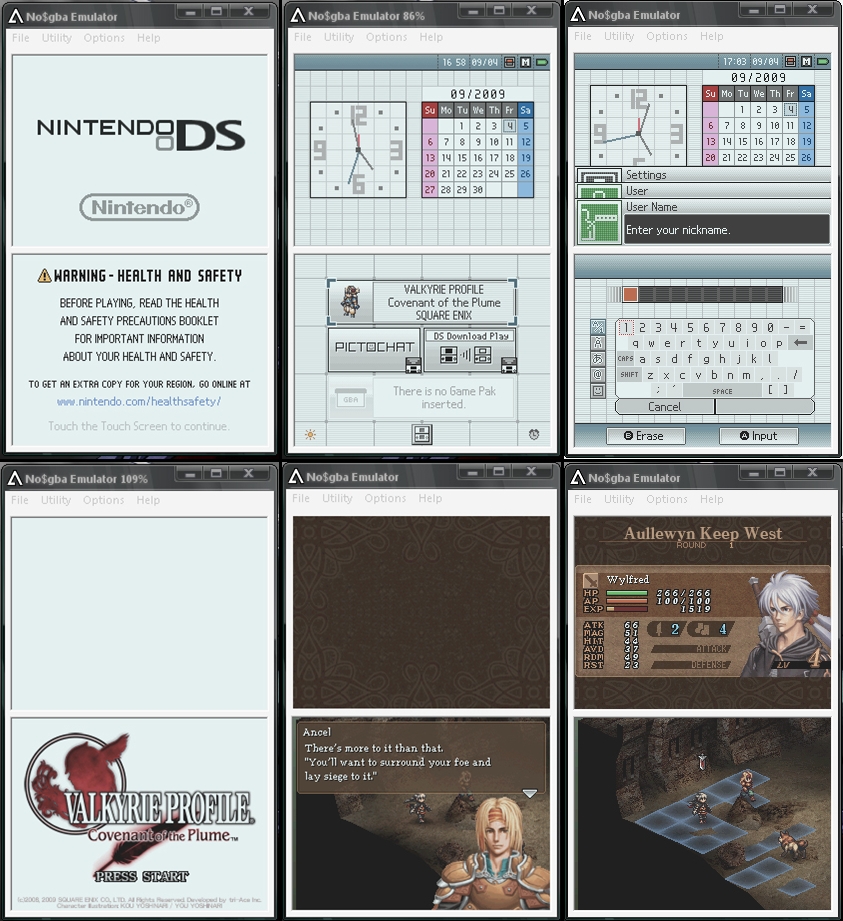
Emulator NDS di Windows | No$GBA 2.6a

Yeap, anda bisa menggunakan Emulator untuk memainkan game" Nintendo DS kesayangan anda di komputer anda.... Salah satu emulator yg terkenal adalah No$GBA.. Meskipun ada beberapa ROM NDS yang tidak bisa dijalankan di No$GBA, tetapi hampir semua ROM NDS sudah bisa dijalankan.

Unduh:
MediaFire

Unduh ROM NDS disini:
romulation.net (Butuh registrasi)
ds.rom-news.rg
nds.hkorz.com (Butuh registrasi)
emuparadise.org (Butuh registrasi)
romscentral.com

Cara menggunakan/menjalankan No$GBA:
1. Extract file-file yang telah anda unduh diatas (MediaFire, No$GBA 2.6a)
2. Kemudian unduh ROM NDS dari salah satu website diatas.
3. Sesudah anda mengunduh ROM NDS, pindahkan ROM Tersebut kedalam folder 'eNDryptS Advanced'
4. Buka 'eNDrypts Advanced.exe', sebuah terminal akan muncul (cmd), pilih pilihan yang pertama 'Decrypt / Encrypt rom(s)' untuk mengdecrypt file ROM yang baru saja anda unduh. Setelah selesai, tutup program tersebut.
5. Buka 'NO$GBA.exe' yang ada didalam folder NO$GBA 2.6a. Sebuah window kecil akan muncul, pilihlah ROM NDS yang baru saja anda decrypt..

Note: Setiap anda mengunduh ROM NDS, anda harus mendecrypt ROM tersebut dahulu, gunakan 'eNDrypts Advanced.exe'

Screenshot:
Read More..

Membuka file yang tidak berekstensi menggunakan Notepad

Jika kita mencoba untuk membuka file tanpa ekstensi di Windows, Windows akan menayakan program apa yang ingin anda gunakan untuk membuka file tersebut. Biasanya, kita menggunakan Notepad untuk membuka file tersebut. Nah, untuk mempermudah, jadikan Notepad standar untuk file yang tidak berekstensi.

Caranya sangat mudah, ikuti langkah" berikut ini:
1. Pertama-tama, buka 'Registry Editor', Start > Run dan ketik:
regedit

2. Ganti direktori anda ke 'HKEY_LOCAL_MACHINE | SOFTWARE | Classes | Unknown | Shell'

3. Klik kanan di window sebelah kiri, dan pilih 'New > Key', buad key baru dengan nama 'Open in Notepad'

4. Kemudian ganti direktori anda ke dalam direktori yang baru saja anda buad yaitu 'Open in Notepad' dan klik ganda pada entri 'Default' yang terdapat di window sebelah kanan. Ganti Value Data menjadi:
Open in Notepad

5. Klik kanan pada key 'Open in Notepad' di window sebelah kiri dan pilih 'New > Key', buad key baru dengan nama 'command'

6. Ganti direktori anda ke 'command', dan klik ganda pada entri 'Default' di window sebelah kanan. Ganti Value Data menjadi:
Notepad.exe %1

7. Tutup Regedit dan restart komputer anda.

Sekarang, jika anda ingin membuka file yang tidak berekstensi, anda cukup klik kanan pada file tersebut dan pilih 'Open in Notepad'.
Read More..

Friday, August 21, 2009

Cedega 7 (Ubuntu, Mandriva, OpenSuse, RPM Based)

Cedega 7.1 untuk Ubuntu, Mandriva, OpenSUSE, dan linux berbasis Red Hat..

Untuk yang belum tahu apa itu Cedega, Cedega merupakan Teknologi proprietary TransGaming dari Wine (dimana lisensi Wine bukan LGPL tetapi lisensi X11), yang khusus didesain untuk menjalankan game yang dibuat untuk Microsoft Windows di Linux. Fokus utamanya adalah mengimplementasikan DirectX API.

Meskipun Cedega merupakan proprietary software, Transgaming menyediakan source untuk publik yang tersedia via CVS, dalam campuran lisensi. Meskipun hal ini pada dasarnya dilakukan untuk memudahkan non-TG staff untuk melihat dan memberikan perbaikan terhadap kode, juga biasanya digunakan untuk mendapatkan versi 'demo' dari Cedega.
Sumber: Wikipedia..

Homepage: www.cedega.com

Download: (Full Version)
Rapidshare

Password: sigma9


Screenshot menyusul.. =3 (blum ada waktu mw upload)
Read More..

Sunday, August 16, 2009

Wallpaper Linux #1

Koleksi Wallpaper Linux... (Gambar telah diperkecil ukuran nya..)
Untuk mengunduh, right klik dan Save As


Read More..

Monday, July 27, 2009

Quick Update.. 27 July 2009 XD

- Changed the blog interface / layout ?
- Updated the Warcraft Section.. Remove unnecessary pics which Slow down the Web load, more simple...
- Updated DotA Maps.. (6.61 & 6.61b)
- Remove "ARCHIVE" in the Navigation Links...

Miscellaneous:
Been busy with my school. Hardly update the blog now... Also planning to change the blog language to English (New post will be in English).. LOL~ XD Just "planning"~ (Comments will be appreciated)

More Update Soon... (Maybe, if I have Time)
Read More..

Wednesday, July 1, 2009

Quick Update - July 02, 2009

- Added LAN Emulators Files in Warcraft Section..
- Uploaded Ai+ Maps for DotA
- More Coming Soon....
Read More..

Thursday, June 11, 2009

Menginstall Fedora 11 Menggunakan LiveCD

English | Indonesia

Ikuti langkah-langkah berikut untuk menginstall Fedora 11 menggunakan LiveCD. Telah dites menggunakan Acer 4520, tetapi dalam pembuatan Tutorial ini, saya menggunakan Virtual Box.

1. Masukkan LiveCD Fedora 11 “Leonidas” dan boot, tunggu beberapa saat hingga mucul layar installer Fedora 11.

2. Dari menu installer Fedora 11, pilih pilihan yang pertama (Boot), atau tunggu saja beberapa detik (8 detik kalau gk salah) sampai installer dengan sendiri nya memboot Fedora1 11 dari LiveCD
Installer Fedora 11 (LiveCD)

3. Tunggu hingga anda dibawa ke Login Screen Fedora 11. Pilih “Automatic Login” dan tekan Enter (Log In).
Login Screen Fedora 11

4. Anda akan dibawa ke Desktop Fedora 11 yang hampir tidak terlalu beda dengan Fedora 10 (untung kali ini xserver tidak mengalami crash seperti yang saya alami di Fedora 10 sebelumnya).
Desktop Fedora 11 (LiveCD)

5. Jika anda ingin mencoba-coba dahulu Fedora 11 silakan saja... Dan jika anda sudah siap menginstall, pilih “Install to Hard Drive” yang ada di Desktop.

6. Tunggu beberapa saat hingga keluar layar Installer Fedora 11 seperti gambar dibawah, kemudian klik Next.
Halaman Utama Installer Fedora 11

7. Anda akan dibawa ke halaman pemilihan keyboard.. Pilihlah Jenis Keyboard sesuai dengan yang anda gunakan. Biasanya si kebanyakan keyboard berjenis U.S English. Next!
Pemilihan Jenis Keyboard

8. Kemudian anda akan diminta untuk memasukkan “hostname” yang ingin anda gunakan untuk komputer anda, defaultnya “localhost.localdomain”. Next...
Menentukan Host Name Untuk Komputer Anda

9. Selanjutnya adalah pemilihan zona waktu dan lokasinya. Pilihlah Zona waktu dan lokasi yang sesuai dengan daerah anda atau yang anda inginkan. Hilangkan tanda centang (System Clock Uses UTC) jika anda mempunyai operating system lain di komputer anda seperti Windows XP. Karena nanti sistem waktu nya akan konflik dengan Windows XP. Next..
Pemilihan Zona Waktu dan Lokasi

10. Di halaman berikutnya, anda akan diminta untuk memasukkan password untuk “root”. Jika sudah, anda tahu apa yang harus dilakukan...
Menentukan Password Root

Jika Password Root didasarkan pada Dictionary, maka akan keluar peringatan seperti gambar dibawah, pilih YES untuk menghiraukan peringatan dan melanjutkan proses instalasi.
Layar yang Muncul jika Password Root didasarkan pada Dictionary

11. Di halaman ini, kita akan melakukan pembuatan partisi, sebenarnya ada lima pilihan layout yang dapat kita gunakan disini, yaitu: use entire drive, replace existing linux system, shrink current system, use free space, create custom layout. Pada Tutorial ini, saya akan menggunakan “Create Custom Layout”. Next....
Halaman Persiapan Pembuatan Partisi

12. Kita akan dibawa ke halaman manajemen harddisk. Disinilah hal yang berbeda dari cara instalasi Fedora 10 sebelumnya... Karena LiveCD Fedora 11 menggunakan filesistem berbasiskan “ext4”, maka kita harus menginstall Fedora 11 ke dalam partisi “ext4”, tetapi file “boot” tidak bisa diinstall kedalam partisi berbasiskan “ext4”, oleh karena itu kita harus membuat 2 partisi, yaitu partisi “ext3” untuk file “boot” dan partisi “ext4” dimana Fedora 11 akan diinstall kedalam partisi tersebut. Dalam contoh ini, RAM yang saya gunakan sebesar 512 MB dan Harddisk sebesar 15 GB. Untuk swap file saya akan mengalokasikan sebesar 1 G, karena biasanya swap file = 2x RAM. Untuk file sistem “ext3” akan saya alokasikan 200 MB (Default), dan sisanya untuk filesistem “ext4” (sekitar 13 GB).
Partisi Sebelum di Modifikasi

13. Pertama-tama kita buat terlebih dahulu swap file nya. Klik pada partisi yang masih kosong, kemudian klik New. Sebuah window akan muncul. Pada File System Type pilih “swap” dan pada size masukkan sesuai kebutuhan anda. Pada contoh ini, saya masukkan 1000 MB. Klik OK jika sudah.
Pembuatan Swap File

14. Kemudian kita akan membuat filesistem “ext3” untuk file “boot”. Klik pada partisi yang masih kosong (Free) dan pilih New. Window yang sama seperti sebelumnya akan muncul. Pada Mount Point, pilih “/boot”. Dan pada File System Type pilih “ext3” dan pada size nya masukkan 200 MB (default, sudah cukup untuk file boot tetapi kalau menurut anda kurang silahkan ditambahkan sesuai kebutuhan). Klik OK.
Pembuatan Partisi ext3 - /boot

15. Dan yang terakhir adalah pembuatana filesistem “ext4” dimana kita akan menginstall Fedora 11. Pilih pada partisi yang masih kosong, kemudian klik New. Pada Mount Point pilih “/”. Dan pada File System Type piling “ext4” dan pada size masukkan sesuai kebutuhan anda. Dalam contoh ini saya masukkan 14158 (Sisa hardisk yang ada). Klik OK.
Pembuatan Partisi ext4 - /

16. Hasil akhir dari pembuatan partisi seharusnya kurang lebih seperti gambar dibawah. Yaitu terdiri dari 1 partisi swap file, 1 partisi ext3 untuk file "boot", dan 1 partisi ext4 untuk sistem.
Hasil Akhir dari Pembuatan Partisi

17. Klik Next jika sudah. Sebuah Window Konfirmasi akan keluar. Jika anda sudah yakin dengan pembuatan partisi sebelumnya, pilih “Write Changes to Disk”. Jika anda belum yakin pilih “Go Back”.

18. Setelah proses Format selesai, anda akan dibawa ke halaman konfigurasi GRUB Bootloader. Jika anda memiliki beberapa Operating System, anda dapat memilih Operating System yang ingin anda jadikan sebagai default. Jika sudah, klik Next.
Konfigurasi GRUB Bootloader


19. Proses instalasi akan berjalan.. Tunggulah beberapa saat hingga selesai. Nanti dihalaman berikutnya, pilih Close (satu-satunya pilihan).
Proses Instalasi Fedora 11


20. Anda akan dibawa kembali ke Desktop LiveCD Fedora 11. Restart/Reboot komputer anda untuk menggunakan Fedora 11 dari Harddisk anda. Jangan lupa untuk mengeluarkan LiveCD Fedora 11 dari CD/DVD-ROM anda.
Read More..

Fedora 11 "Leonidas"

Setelah 2 kali penundaan Final Rilis Fedora 11, sebelumnya perilisan Fedora 11 dijadwalkan pada tanggal 26 Mei kemudian 2 Juni, tapi kemudian ditunda lagi hingga akhirnya Fedora 11 dirilis pada tanggal 9 Juni 2009, Fedora 11 ini diberi code name "Leonidas".

Beberapa perubahan signifikan yang dapat anda lihat di Fedora 11 adalah penggunaan desktop KDE 4.2, Gnome 2.26, XFCE 4.6, dan OpenOffice 3.1.0 serta penggunaan Mozilla Firefox 3.5.4 Beta (terdapat fitur baru dimana anda dapat melakukan Private Browsing). Selain itu Fedora 11 juga menjanjikan bahwa start up hingga ke Login Screen hanya akan membutuhkan waktu 20 detik saja. Fedora 11 juga telah menggunakan filesystem berbasis "ext4", dimana filesystem "ext4" ini mempunyai performa yang lebih bagus daripada "ext3". Dan bagi anda yang memiliki laptop dengan Fingerprint Reader, ini dijanjikan akan bekerja dengan baik di Fedora 11. Masih banyak lagi perubahan-perubahan yang ada di Fedora 11, bagi anda yang ingin mengetahui fitur-fitur baru apa lagi yang ada di Fedora 11 bisa anda lihat disini http://fedoraproject.org/wiki/Releases/11/FeatureList atau bisa langsung anda coba sendiri saja.. ^^

Bagi anda yang ingin mencoba Fedora 11,anda dapat mengunduh Fedora 11 dari http://fedoraproject.org/get-fedora. Jika anda merasa kecepatan unduh dari fedoraproject.org sangat lambat, anda juga dapat mengunduh Fedora 11 dari Mirror yang ada di Indonesia:
Fedora 11 DVD
  • ftp://dl2.foss-id.web.id/iso/fedora/11/Fedora/i386/
  • ftp://kambing.ui.ac.id/iso/fedora/11/Fedora/i386/iso/ - i386
  • ftp://kambing.ui.ac.id/iso/fedora/11/Fedora/x86_64/iso/ - x86_64

  • Fedora 11 LiveCD
  • ftp://dl2.foss-id.web.id/iso/fedora/11/Live/
  • ftp://kambing.ui.ac.id/iso/fedora/11/Live/

  • Screenshots:
    Login Screen di Fedora 11

    Desktop Fedora 11 - LiveCD
    Read More..

    Wednesday, June 3, 2009

    Menginstall Driver NVIDIA di Fedora 10 - Acer 4520

    Sebelumnya kita telah berhasil menginstall Fedora 10 di Acer 4520 menggunakan Live CD. Tetapi tampilan layar di Desktop Fedora menggunakan Resolution yang sangat rendah dan gambarnya buram karena kita menggunakan driver Vesa (ingat xorg.conf yang kita pindahkan ke directory /etc/X11). Untuk mengganti tampilan ke resolusi yang lebih tinggi dan memperindah tampilan layar di Fedora 10 kita perlu menginstall Driver NVIDIA. Ikuti langkah berikut:
    Note: Butuh Koneksi Internet

    1. Pertama-tama, unduh dahulu driver NVIDIA untuk Linux dari Homepage NVIDIA Unix: http://www.nvidia.com/object/unix.html. Dalam tutorial ini saya menggunakan Driver versi "177.82".

    2. Sesudah mengunduh driver tersebut, kita harus menginstall paket "binutils", "make", "gcc", dan "kernel-devel". Gunakan System > Administration > Add/Remove Software untuk menginstall paket-paket tersebut.

    3. Sesudah anda menginstall paket-paket tersebut barulah kita menginstall Driver NVIDIA menggunakan driver yang baru saja kita download. Buka Terminal dan jalankan sebagai 'root', #su. Kemudian ketik #init 4 untuk mematikan xserver dan menjalankan 'console login'. Login sebagai root. Kemudian pindah ke directory tempat anda mengunduh file 'Driver NVIDIA' (NVIDIA-Linux-x86-177.82-pkg1.run). Jalankan Installer Driver NVIDIA menggunakan perintah #sh NVIDIA-Linux-x86-177.82-pkg1.run. Ikuti langkah-langkah yang muncul di layar. Pada saat installer menayakan apakah anda ingin mengunduh kernel dari web NVIDIA, pilih "No". Karena anda tidak mau mengunduh kernel dari web NVIDIA, installer akan mengcompile kernel sendiri, disinilah gunanya kita menginstall paket-paket di langkah ke 2. Setelah selesai, restart komputer.

    4. Sekarang anda dapat menggunakan desktop Fedora 10 di Acer 4520 anda dengan resolusi yang tinggi dan tampilan yang indah. Untuk mengaktifkan "Desktop Effect", buka 'System > Preferences > Look and Feel > Desktop Effects' dan pilih "Enable Desktop Effects"

    Note: Anda harus menginstall ulang driver NVIDIA setiap kali anda mengupdate "kernel". (Jalankan kembali installer driver NVIDIA)
    Read More..

    Menggunakan Repository Indonesia di Fedora 10

    Sewaktu kita menginstall/mengunduh paket-paket menggunakan yum, kecepatan unduhnya sangat lambat ini disebabkan karena kita mengunduh dari repository Fedora yang terdapat di luar negeri. Untuk mempercepat unduh/install melalui yum, gunakan repository Indonesia. Ikuti langkah-langkah berikut untuk mengatur agar yum menggunakan Repository Fedora Indonesia:

    1. Buka terminal dan jalankan sebagai root, #su. Kemudian ganti directory ke /etc/yum.repos.d/ dan buat file baru dengan nama "fedora.mirror" kemudian buka file tersebut dan isikan dengan:
    http://dl2.foss-id.web.id/fedora/releases/10/Everything/i386/os/
    Note: Isi diatas bisa juga diganti dengan repository Fedora Indonesia yang lain, lihat dibagian bawah tutorial untuk repository Fedora Indonesia yang lain.
    Save dan exit.

    2. Kemudian edit file /etc/yum.repos.d/fedora.repo, edit isinya menjadi berikut:
    [fedora]
    name=Fedora $releasever - $basearch
    failovermethod=priority
    #baseurl=http://download.fedoraproject.org/pub/fedora/linux/releases/$releasever/Everything/$basearch/os/
    mirrorlist=file:///etc/yum.repos.d/fedora.mirror
    enabled=1
    gpgcheck=1
    gpgkey=file:///etc/pki/rpm-gpg/RPM-GPG-KEY-fedora-$basearch
    Jika anda perhatikan, mirrorlist-nya kita ganti dari 'http://mirrors.fedoraproject.org/mirrorlist?repo=fedora-$releasever&arch=$basearch' menjadi 'file:///etc/yum.repos.d/fedora.mirror' yang merupakan file yang baru saja kita buat di langkah pertama. Sekarang untuk Software Source "Fedora" akan menggunakan Repository Indonesia.

    3. Untuk Software Sources "Fedora-Updates" kita harus membuat satu file di /etc/yum.repos.d/ dengan nama "updates.mirror". Kemudian isikan file tersebut dengan:
    http://dl2.foss-id.web.id/fedora/updates/10/i386/
    Kemudian Save dan Exit.

    4. Sekarang buka "fedora-updates.repo" untuk mengedit file agar menggunakan repository Fedora Indonesia juga, edit isinya menjadi seperti berikut:
    [updates]
    name=Fedora $releasever - $basearch - Updates
    failovermethod=priority
    #baseurl=http://download.fedoraproject.org/pub/fedora/linux/updates/$releasever/$basearch/
    mirrorlist=file:///etc/yum.repos.d/updates.mirror
    enabled=1
    gpgcheck=1
    gpgkey=file:///etc/pki/rpm-gpg/RPM-GPG-KEY-fedora-$basearch
    Perhatikan disini saya juga mengganti mirrorlist menjadi "file:///etc/yum.repos.d/updates.mirror" yang merupakan file "updates.mirror" yang saya buat tadi. Sekarang, Software Sources "Fedora-Updates" juga menggunakan Repository Fedora Indonesia.

    5. Kemudian buka 'System > Administration > Add/Remove Software' kemudian buka menu 'System > Refresh package list', untuk merefresh package list. Sekarang anda sendiri pasti dapat merasakan perubahan kecepatan donwload yang sangat tinggi sewaktu menginstall paket-paket menggunakan yum.

    List Repository Fedora Indonesia:
    http://fedora.cbn.net.id/
    http://dl2.foss-id.web.id/fedora/
    ftp://kambing.ui.edu/fedora/
    Read More..

    Menginstall Fedora 10 di Acer 4520 menggunakan Live CD

    Desktop Fedora 10 di Acer 4520

    Cara menginstall Fedora 10 di Acer 4520 menggunakan Live CD:

    1. Untuk dapat menggunakan Live CD Fedora 10, buat dulu sebuah file dengan nama "xorg.conf" dan ketik text berikut (Copy Paste kalau mau lebih gampang):
    Section "ServerLayout"
    Identifier "single head configuration"
    Screen 0 "Screen0" 0 0
    InputDevice "Keyboard0" "CoreKeyboard"
    EndSection

    Section "InputDevice"
    Identifier "Keyboard0"
    Driver "kbd"
    Option "XkbModel" "pc105+inet"
    Option "XkbLayout" "us"
    EndSection

    Section "Device"
    Identifier "Videocard0"
    Driver "vesa"
    EndSection

    Section "Screen"
    Identifier "Screen0"
    Device "Videocard0"
    DefaultDepth 24
    SubSection "Display"
    Viewport 0 0
    Depth 24
    EndSubSection
    EndSection

    Kemudian pindahkan file "xorg.conf" tersebut kedalam flashdisk atau USB.
    File: xorg.conf (bagi yang malas copy paste, saya kasih konfigurasi xorg.conf saya)

    2. Setelah membuat file tersebut dan menyimpannya di dalam flash disk atau USB barulah boot Live CD Fedora 10 di Acer 4520. Tunggu beberapa saat hingga muncul Splash Screen Fedora 10 dengan garis Biru/Biru muda/Putih di bagian bawah screen. Setelah boot screen tersebut, Xserver akan mengalami crash dan menampilkan Black Screen. Inilah gunanya kita membuat file "xorg.conf" di langkah pertama.

    3. Tekan CTRL+ALT+F2 untuk mengganti layar ke terminal Login 2. Masukkan 'root' sebagai username. Kemudian hubungkan Flash Disk ke komputer. Pindah ke directory 'media' #cd /media. Kemudian buar directory baru dengan nama 'disk' #mkdir disk. Mount Flash disk ke directory 'disk' #mount /dev/sdb1 /media/disk. Kemudian pindah ke directory /media/disk dan copy file 'xorg.conf' ke dalam folder /etc/X11 (ex. #cp /media/disk/xorg.conf /etc/X11). Setelah selesai mengcopy file "xorg.conf" unmount flash disk anda karena jika tidak akan terjadi error saat instalasi (ex. #umount /dev/sdb1).

    4. Sekarang start x server, #startx. Desktop Fedora 10 sekarang akan muncul...

    5. Untuk menginstall, pilih Install di Desktop. Ikuti langkah-langkah yang ditampilkan di layar komputer.

    6. Jika sudah selesai menginstall Fedora 10 ke Hard disk, jangan restart dahulu. Karena sewaktu anda memboot Fedora 10 dari Hard disk, xserver akan crash lagi. Copy file "xorg.conf" yang ada di Flash disk tadi ke folder '/etc/X11' yang berada di hard disk tempat anda menginstall Fedora 10 (ex. sda1, sda2, sda3, etc)

    7. Kemudian Restart...
    Read More..

    Menginstall Font Microsoft di Fedora 10

    Font Microsoft di Fedora 10 - OpenOffice 3.0

    Untuk dapat menginstall Font Microsoft di Fedora 10, pastikkan anda mempunyai paket-paket berikut: (butuh koneksi internet)
    - rpm-build
    - wget
    - cabextract
    - ttmkfdir
    - chkfontpath
    Jika anda tidak mempunyai paket-paket tersebut, install terlebih dahulu menggunakan 'System > Administration > Add/Remove Software atau menggunakan yum: #yum install rpm-build wget cabextract ttmkfdir.
    Untuk paket "chkfontpath", download dari sini http://dl.atrpms.net/all/chkfontpath-1.10.1-2.fc10.i386.rpm.

    Sesudah menginstall paket-paket tersebut, barulah kita mendownload file "msttcorefonts spec" yang akan dibutuhkan untuk mengunduh font-font yang diperlukan. Download dari sini http://corefonts.sourceforge.net/msttcorefonts-2.0-1.spec.

    Jika sudah, buka terminal dan pindah ke directory tempat anda mengunduh file "msttcorefonts-2.0-1.spec". Kemudian ketik perintah #rpmbuild -bb msttcorefonts-2.0-1.spec. (Perintah ini akan mengunduh file font-font yang dibutuhkan dari internet, besar font-font yang diunduh sekitar 8 Megabyte)

    Kemudian install file .rpm yang baru saja kita buat. Buka terminal dan login sebagai ROOT, #su. kemudian ketik #rpm -ivh $HOME/rpmbuild/RPMS/noarch/msttcorefonts-2.0-1.noarch.rpm. (Ganti $HOME dengan directory HOME anda, misalnya /home/sebastian)

    Sesudah menginstall file .rpm yang kita buat, restart komputer anda.

    Sekarang anda dapat menggunakan font Microsoft di desktop Fedora 10 anda.
    Read More..

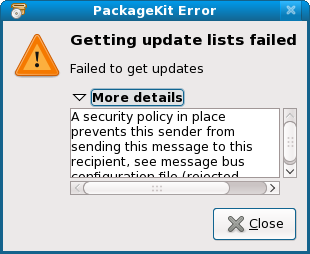
    Masalah Setelah Mengupdate Fedora 10

    Error yang Muncul pada Package Manager Fedora 10

    Minggu kemarin saya mengupdate Desktop Fedora 10, besarnya file yang diunduh sekitar >100 Megabyte. Setelah menunggu beberapa lama, selesai juga akhirnya, langsung saja saya restart komputer saya. Pada waktu startup semuanya berjalan baik-baik saja. Sampai pada waktu saya ingin menginstall paket dari 'System > Adminstration > Add/Remove Software' muncul sebuah warning 'Packagekit "failed to get a TID:" - rendered unusable '. Dan juga timbul beberapa masalah lain, menu "Services" tidak dapat dibuka, Applet Bluetooth di panel tidak berfungsi, menu "Samba" tidak dapat dibuka, dan mungkin beberapa masalah lainnya.

    Bagi teman-teman yang juga mempunyai masalah seperti tadi setelah melakukan update, ikuti langkah berikut untuk memperbaikinya:

    1. Pertama buat dahulu backup dari file "/etc/dbus-1/system.conf" kalau-kalau terjadi error atau crash. (copy file "system.conf" ke Desktop atau directory lain)

    2. Kemudian buka terminal dan jalankan sebagai root, #su.

    3. Ketik #gedit /etc/dbus-1/system.conf

    4. Kemudian cari teks dengan string:
    <allow send_requested_reply="true" send_type="method_return"/>
    <allow send_requested_reply="true" send_type="error"/>
    dan ganti dengan:
    <allow send_requested_reply="true"/>


    5. Save dan exit, kemudian restart.

    6. Sekarang anda dapat menggunakan kembali "Package Manager, Services, Samba, Applet Bluetooth, etc".
    Read More..

    Mengunduh Distro-distro Linux menggunakan Mirror Indonesia

    Kalau kita mengunduh distro-distro linux menggunakan mirror luar negeri, koneksinya akan terasa lambat, untuk mempercepat koneksi atau kecepatan unduh, gunakan saja mirror Indonesia. Berikut daftar Distro-distro Linux yang ada di Indonesia:

    BlankOn

    BlankOn Konde (2.0)
    http://cdimage.blankonlinux.or.id/rilis/2.0/
    ftp://kambing.ui.edu/pub/blankon/konde
    ftp://dl2.foss-id.web.id/iso/blankon/konde/
    ftp://mirror.unej.ac.id/pub/iso/blankon/rilis/konde/

    BlankOn Lontara (3.0)
    http://cdimage.blankonlinux.or.id/rilis/3.0/
    ftp://kambing.ui.edu/pub/blankon/lontara
    ftp://mirror.unhas.ac.id/ISO/blankon/lontara/
    ftp://dl2.foss-id.web.id/iso/blankon/lontara/
    ftp://mirror.unej.ac.id/pub/iso/blankon/rilis/lontara/

    BlankOn Meuligoe (4.1)
    http://cdimage.blankonlinux.or.id/rilis/4.1/
    ftp://kambing.ui.edu/pub/blankon/meuligoe/
    ftp://mirror.unhas.ac.id/ISO/blankon/meuligoe/
    ftp://dl2.foss-id.web.id/iso/blankon/meuligoe/
    ftp://mirror.unej.ac.id/pub/iso/blankon/rilis/meuligoe/


    CentOS
    CentOS 3.9
    ftp://ubuntu.cbn.net.id/pub/CentOS/3.9/isos/

    CentOS 4.6
    ftp://ubuntu.cbn.net.id/pub/CentOS/4.6/isos/

    CentOS 4.7
    ftp://ubuntu.cbn.net.id/pub/CentOS/4.7/isos/

    CentOS 5.1
    ftp://kambing.ui.edu/pub/centos/5.1

    CentOS 5.2
    ftp://kambing.ui.edu/pub/centos/5.2
    ftp://dl2.foss-id.web.id/iso/centos/5.2/
    ftp://mirror.unej.ac.id/pub/iso/centos/
    ftp://ubuntu.cbn.net.id/pub/CentOS/5.2/isos/


    Damn Small Linux

    ftp://mirror.unhas.ac.id/ISO/lightweight-distros/
    ftp://kambing.ui.edu/pub/damnsmall/archive/
    ftp://dl2.foss-id.web.id/iso/dsl/
    ftp://mirror.unej.ac.id/pub/iso/dsl/


    Fedora
    Fedora 7 (Moonshine)
    ftp://kambing.ui.edu/pub/fedora/7

    Fedora 8 (Werewolf)
    ftp://kambing.ui.edu/pub/fedora/8
    ftp://dl2.foss-id.web.id/iso/fedora/8/

    Fedora 9 (Sulphur)
    ftp://kambing.ui.edu/pub/fedora/9
    ftp://dl2.foss-id.web.id/iso/fedora/9/
    ftp://mirror.unej.ac.id/pub/iso/fedora/9/

    Fedora 10 (Campbridge)
    ftp://kambing.ui.edu/pub/fedora/10
    ftp://mirror.unhas.ac.id/ISO/Fedora/
    ftp://dl2.foss-id.web.id/iso/fedora/10/
    ftp://mirror.unej.ac.id/pub/iso/fedora/10/


    Kubuntu
    Kubuntu 6.06 (Dapper Drake)
    ftp://kambing.ui.edu/pub/ubuntu/kubuntu/6.06
    ftp://dl2.foss-id.web.id/iso/kubuntu/dapper/
    ftp://mirror.unej.ac.id/pub/iso/kubuntu/dapper/
    ftp://ubuntu.cbn.net.id/pub/Ubuntu-Release/kubuntu/dapper/
    ftp://kebo.vlsm.org/ISO/ubuntu-cdimage/kubuntu/dapper/

    Kubuntu 6.10 (Edgy Eft)
    ftp://kambing.ui.edu/pub/ubuntu/kubuntu/6.10

    Kubuntu 7.04 (Feisty Fawn)
    ftp://kambing.ui.edu/pub/ubuntu/kubuntu/7.04

    Kubuntu 7.10 (Gutsy Gibbon)
    ftp://kambing.ui.edu/pub/ubuntu/kubuntu/7.10
    ftp://dl2.foss-id.web.id/iso/kubuntu/gutsy/
    ftp://mirror.unej.ac.id/pub/iso/kubuntu/gutsy/
    ftp://ubuntu.cbn.net.id/pub/Ubuntu-Release/kubuntu/gutsy/
    ftp://kebo.vlsm.org/ISO/ubuntu-cdimage/kubuntu/gutsy/

    Kubuntu 8.04 (Hardy Heron)
    ftp://kambing.ui.edu/pub/ubuntu/kubuntu/8.04
    ftp://dl2.foss-id.web.id/iso/kubuntu/hardy/
    ftp://mirror.unej.ac.id/pub/iso/kubuntu/hardy/
    ftp://ubuntu.cbn.net.id/pub/Ubuntu-Release/kubuntu/hardy/
    ftp://kebo.vlsm.org/ISO/ubuntu-cdimage/kubuntu/hardy/

    Kubuntu 8.10 (Intrepid Ibex)
    ftp://kambing.ui.edu/pub/ubuntu/kubuntu/8.10

    ftp://dl2.foss-id.web.id/iso/kubuntu/intrepid/
    ftp://mirror.unej.ac.id/pub/iso/kubuntu/intrepid/
    ftp://ubuntu.cbn.net.id/pub/Ubuntu-Release/kubuntu/intrepid/
    ftp://kebo.vlsm.org/ISO/ubuntu-cdimage/kubuntu/intrepid/


    Linux Mint
    Linux Mint 3.0 (Cassandra)
    ftp://kambing.ui.edu/pub/linuxmint/3.0/

    Linux Mint 3.1 (Celena)
    ftp://kambing.ui.edu/pub/linuxmint/3.1/

    Linux Mint 4.0 (Daryna)
    ftp://kambing.ui.edu/pub/linuxmint/4.0/

    Linux Mint 5.0 (Elyssa)
    ftp://mirror.unhas.ac.id/ISO/linuxmint/
    ftp://dl2.foss-id.web.id/iso/linuxmint/5/

    Linux Mint 6.0 (Felicia)
    ftp://dl2.foss-id.web.id/iso/linuxmint/6/


    Mandriva
    Mandriva 2007.1
    ftp://kambing.ui.edu/pub/mandriva/2007.1/

    Mandriva 2008.1
    ftp://kambing.ui.edu/pub/mandriva/2008.1/
    ftp://dl2.foss-id.web.id/iso/mandriva/2008.1/

    Mandriva 2009.0
    ftp://mirror.unhas.ac.id/ISO/Mandriva/
    ftp://dl2.foss-id.web.id/iso/mandriva/2009.0/


    OpenSUSE
    OpenSUSE 10.3
    ftp://kambing.ui.edu/pub/opensuse/10.3/iso/

    OpenSUSE 11.0
    ftp://kambing.ui.edu/pub/opensuse/11.0/iso/
    ftp://dl2.foss-id.web.id/iso/opensuse/distribution/11.0/iso/
    ftp://mirror.unej.ac.id/pub/iso/opensuse/11.0/

    OpenSUSE 11.1
    ftp://dl2.foss-id.web.id/iso/opensuse/distribution/11.1/iso/
    ftp://mirror.unej.ac.id/pub/iso/opensuse/11.1/


    Slackware
    ftp://kambing.ui.edu/pub/slackware/

    ftp://mirror.unej.ac.id/pub/iso/slackware/

    Slackware 12.0
    ftp://dl2.foss-id.web.id/iso/slackware/12.0/

    Slackware 12.1
    ftp://dl2.foss-id.web.id/iso/slackware/12.1/

    Slackware 12.2
    ftp://dl2.foss-id.web.id/iso/slackware/12.2/


    Ubuntu
    Ubuntu 6.06 (Dapper Drake)
    ftp://kambing.ui.edu/pub/ubuntu/ubuntu/6.06
    ftp://kambing.ui.edu/pub/ubuntu/ubuntu/6.06.1
    ftp://dl2.foss-id.web.id/iso/ubuntu/releases/dapper/
    ftp://mirror.unej.ac.id/pub/iso/ubuntu/dapper/
    ftp://ubuntu.cbn.net.id/pub/Ubuntu-Release/dapper/
    ftp://kebo.vlsm.org/ISO/ubuntu-cdimage/dapper/

    Ubuntu 6.10 (Edgy Eft)
    ftp://kambing.ui.edu/pub/ubuntu/ubuntu/6.10

    Ubuntu 7.04 (Feisty Fawn)
    ftp://kambing.ui.edu/pub/ubuntu/ubuntu/7.04

    Ubuntu 7.10 (Gutsy Gibbon)
    ftp://kambing.ui.edu/pub/ubuntu/ubuntu/7.10
    ftp://dl2.foss-id.web.id/iso/ubuntu/releases/gutsy/
    ftp://mirror.unej.ac.id/pub/iso/ubuntu/gutsy/
    ftp://ubuntu.cbn.net.id/pub/Ubuntu-Release/gutsy/
    ftp://kebo.vlsm.org/ISO/ubuntu-cdimage/gutsy/

    Ubuntu 8.04 (Hardy Heron)
    ftp://kambing.ui.edu/pub/ubuntu/ubuntu/8.04
    ftp://mirror.unhas.ac.id/ISO/ubuntu/
    ftp://dl2.foss-id.web.id/iso/ubuntu/releases/hardy/
    ftp://mirror.unej.ac.id/pub/iso/ubuntu/hardy/
    ftp://ubuntu.cbn.net.id/pub/Ubuntu-Release/hardy/
    ftp://kebo.vlsm.org/ISO/ubuntu-cdimage/hardy/

    Ubuntu 8.10 (Intrepid Ibex)
    ftp://kambing.ui.edu/pub/ubuntu/ubuntu/8.10
    ftp://mirror.unhas.ac.id/ISO/ubuntu/
    ftp://dl2.foss-id.web.id/iso/ubuntu/releases/intrepid/
    ftp://mirror.unej.ac.id/pub/iso/ubuntu/intrepid/
    ftp://ubuntu.cbn.net.id/pub/Ubuntu-Release/intrepid/
    ftp://kebo.vlsm.org/ISO/ubuntu-cdimage/intrepid/


    Zencafe
    Zencafe 1.0
    ftp://dl2.foss-id.web.id/iso/zencafe/1.0/

    Zencafe 1.2
    ftp://dl2.foss-id.web.id/iso/zencafe/1.2/

    Zencafe 1.4
    ftp://dl2.foss-id.web.id/iso/zencafe/1.4/
    ftp://mirror.unej.ac.id/pub/iso/zencafe/1.4/
    Read More..

    Menginstall Samba Server di Fedora 10

    Ikuti langkah-langkah/tutorial dibawah ini untuk menginstall dan mengkonfigurasi Samba di Fedora 10.

    Login Windows di Windows XP (Samba)

    Mengakses File di Fedora 10 dari WindowsXP (Samba)

    1. Menginstall Samba

    Menginstall Samba Menggunakan Package Manager (gpk-application)

    Untuk menginstall samba, gunakan Package Manager:
    'System > Administration > Add/Remove Software'
    kemudian cari dan install paket 'samba' dan 'samba-client'

    Atau bisa juga menggunakan terminal (Butuh Otentikasi Root, #su)
    #yum install samba samba-client

    2. Menjalankan Samba pada saat Startup/Boot
    Untuk menjalankan Samba pada saat Starup, gunakan 'system-config-services'
    'System > Administration > Services'
    kemudian cari dan enable service 'smb'.

    Atau bisa juga menggunakan terminal (Sekali lagi membutuhkan Otentikasi Roor, #su)
    #chkconfig smb on


    3. Konfigurasi Samba
    Untuk mengkonfigurasi Samba, buka dan edit file '/etc/samba/smb.conf'
    Anda dapat mengganti nama WORKGROUP, menambahkan Share, mengkonfigurasi Domain samba, dll disini.

    Untuk mengganti nama Workgroup Windows anda, edit 'workgroup = xxx' dibawah konfigurasi [global]
    ex.
    workgroup = Samba Server
    Untuk menambah Share, tambahkan konfigurasi seperti berikut di bagian paling bawah file 'smb.conf' (Ganti sesuai dengan kebutuhan anda)

    [Public]
    path = /home/sebastian/Public
    public = yes
    writable = yes
    [Shared Folder]
    comment = Shared Folder Read Only
    path = /home/sebastian/Shared
    public = yes
    writable = no
    Jika anda tidak ingin mengshare directory 'Home' anda, berikan tanda ';' sebelum teks [homes] (Terdapat di bagian bawah file)

    4. Menambah/Menghapus Network Users Samba
    Untuk dapat mengakses file/folder di Linux yang telah kita share melalui Windows, anda harus menjadi user SAMBA terlebih dahulu. Untuk menambah user SAMBA. gunakan perintah: (Butuh Otentikasi Root, #su)
    #smbpasswd -a username_fedora

    ex.
    [sebastian@linfreak ~]$ su
    Password:
    [root@linfreak sebastian]# smbpasswd -a sebastian
    New SMB password:
    Retype new SMB password:
    account_policy_get: (warnings ignored)
    Added user username.
    Note: Username anda harus sama dengan username Fedora anda, sedangkan untuk password tidak harus sama dengan password Fedora anda.

    5. Menjalankan Service Samba
    Menjalankan Service Samba Menggunakan 'system-config-services'

    Untuk menjalankan Samba bisa menggunakan 'system-config-services' dan bisa juga melalui Terminal.
    Melalui 'system-config-services':
    'System > Administration > Services'
    Cari service 'smb' dan tekan tombol START, tekan STOP untuk menghentikan service.

    Melalui Terminal:
    #service smb [option]
    Option:
    start = menjalankan service
    stop = menghentikan service
    restart = menghentikan service kemudian menyalakan service kembali
    Atau bisa juga menggunakan perintah
    #/etc/init.d/smb [option]

    ex.
    [sebastian@linfreak ~]$ su
    Password:
    [root@linfreak sebastian]# service smb start
    Starting SMB services: [ OK ]
    [root@linfreak sebastian]# service smb restart
    Shutting down SMB services: [ OK ]
    Starting SMB services: [ OK ]
    6. Membuka Port Samba di Firewall
    Membuka port Samba menggunakan 'system-config-firewall' untuk memperboleh koneksi ke server Samba

    Untuk memperboleh koneksi Samba dari luar, kita harus membuka port samba terlebih dahulu, gunakan 'system-config-firewall'
    'System > Administration > Firewall'
    Pada list 'Trusted Services', beri tanda cek pada Service 'Samba' dan 'Samba Client'.

    Note: Anda perlu merestart service 'smb' setiap kali anda mengedit file '/etc/samba/smb.conf'
    Read More..